
Workout log
A workout log app for the sets you actually did
Record each workout in BodyPlus, keep your history in one place, and see how your lifts and your body weight change over time.
Now on Google Play. Adults 18+. iOS: not yet.

What you can log
Workouts and sets
Record the exercises, sets, reps and weights from each session.
Training history
Look back at past sessions and see how consistent you have been.
Exercise progress
Follow one exercise over time: saved sets, volume, and your load compared with your body weight.
Body weight
Log your weight and see its trend next to your training.
Inside BodyPlus
From sets to trends
Every set you log feeds the views you use to plan the next one.
- Sets you log
- Training history
- Exercise charts
How it works
Start from your plan
Open today's workout from your plan, or record a workout on its own.
Log each set
Enter the weight and reps for each set as you finish it.
Review your progress
After the workout, find it in your history and follow each exercise over time.
Who it is for. BodyPlus suits people who train with weights, at the gym or at home, and want one place for their plan, their sets and their progress instead of a notebook or a spreadsheet.
Why a workout log helps
Progressive overload, adding a little weight or a few reps over time, is a core principle of strength training. A log shows what you lifted last time, so you can choose today's weights on purpose instead of guessing.
It also shows your consistency: how often you trained and which exercises you kept up.

Barbells, dumbbells or machines
Your log goes where you train. Record a barbell session, a dumbbell workout or a round of machines, at the gym or at home, and your history and progress views pick it up the same way.
Training at home? Start with our guide to home workout exercises, then log what you do.

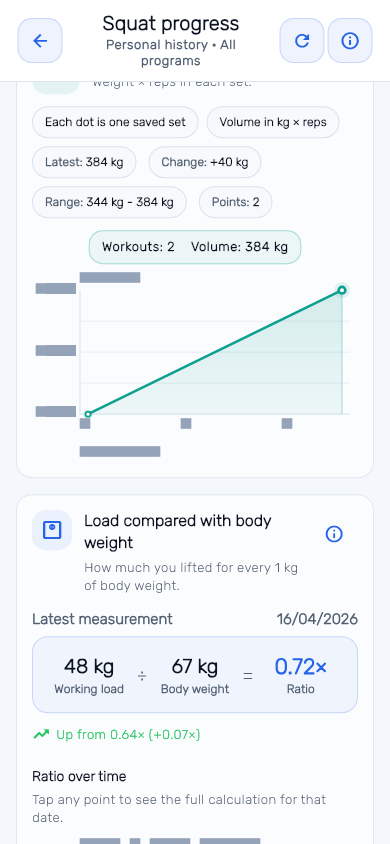
See each exercise over time
Every saved set becomes a point on the exercise chart, so you can see whether your volume and load are moving.
Real BodyPlus product screen shown with representative sample data. Interface details may evolve. People in photos are AI-generated and illustrative.
Good to know
- You enter your sets yourself. BodyPlus does not count reps automatically and does not use your camera.
- Your plan lives in the same app, so the next workout is ready when you start logging.
- The app is free to download. BodyPlus Pro and Credits are optional in-app purchases.
Is BodyPlus a free workout log app?
You can download BodyPlus and log your workouts for free. BodyPlus Pro and Credit packs are optional in-app purchases that add Credits for AI Coach answers.
Does it count my reps automatically?
No. You record your sets yourself. The app does not use your camera.
Can I see my progress for one exercise?
Yes. Each exercise has a progress view with your saved sets, volume and load compared with your body weight.
Is BodyPlus on iPhone?
Not yet. BodyPlus is on Google Play for Android, for adults 18 and over.
What do I need to start?
An Android phone and a BodyPlus account. Download the app from Google Play and set up your profile and goal.
Is my training data private?
BodyPlus does not sell personal information. The Privacy Policy explains what is stored and how to delete your account.